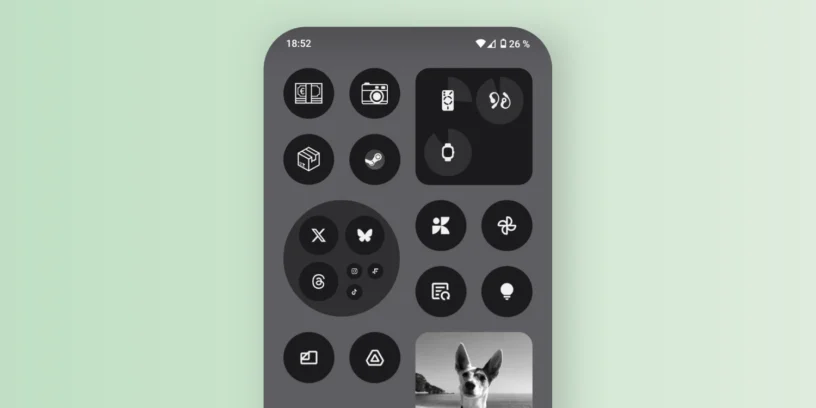
At NothingTec we constantly bring you tricks and tutorials to get the most out of your Nothing Phone and its operating system Nothing OS, as Remove icons from the status bar o duplicate an app. Today we'll show you another very useful setting to personalize your home screen: Remove app names to leave only visible icons.
This option is perfect for those seeking a more minimalist and uncluttered look. This way, you'll only see the icons on your desktop, without any text underneath, giving a cleaner and more modern feel.
The process to activate this option is very simple:
- On the home screen, Press and hold on the wallpaper (not about an icon)
- In the menu that appears, tap «"Personalization"»
- Then select «"Provision"»
- Here you will see an option called «"Label application"»
- Simply unmark it so that the app names disappear
And that's it! As soon as you return to the home screen, you'll only see the icons, without the names underneath. If you ever want to show them again, just repeat the process and select the option again.

These kinds of details help personalize your experience, allowing the system design to better suit your style. At NothingTec, we're always looking for these small adjustments that make all the difference. Follow me on Twitter/X or in TikTok For more tips, tricks, and news.

1 Pingback