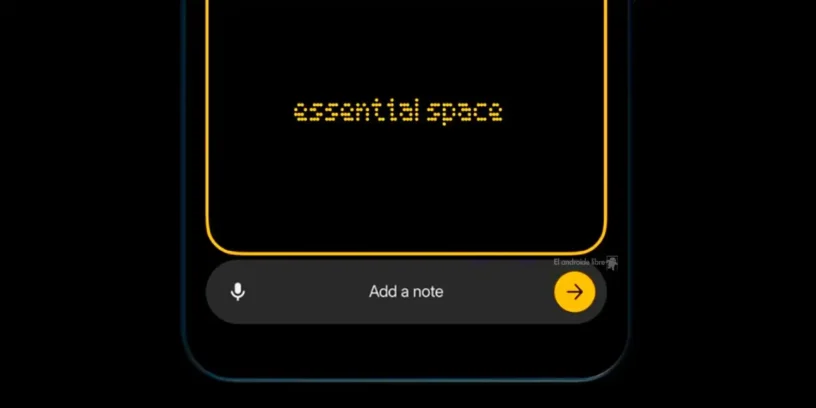
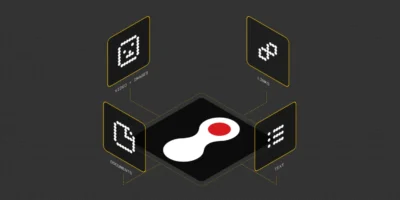
Nothing has introduced one of its most innovative features to date: Essential Space, a tool powered by artificial intelligence which turns your Nothing Phone (3a) into a second memory capable of intelligently organizing your notes, ideas, and inspirations.
This article is based on a detailed user analysis Technerd_9 on X (Twitter), where he explains all the current and future features of Essential Space. I recommend visiting his Twitter thread, where he accompanies this information with screenshots and examples. Let's break it down in detail.
What is Essential Space? 🤖
Essential Space It is a smart space within the Nothing Phone (3a) Series designed for store and manage notes, images, and inspirations more efficiently. Its purpose is to act as an extension of your memory, organizing key information and reminding you of the essentials at the right time.
Imagine a JARVIS from Iron Man on your phone, managing your important tasks and reminding you of crucial events. That's how Essential Space works.
Access to Essential Space: Essential Key 🔑
Nothing has incorporated Essential Key, A dedicated key just below the power button allows you to easily capture and manage information:
- Single press → Capture the screen and send it to Essential Space.
- Long press → Record audio and capture.
- Double pulse → Open Essential Space.
Essential Key It is the key to interacting with this second memory, facilitating image capture, voice recording, and task management all in one place.
How to use Essential Key to capture information 📲
- Capture screenshotPress Essential Key and then tap the arrow to send it to Essential Space.
- Record audio: Press and hold Essential Key, Record your voice and release it to send the recording.
- Add textPress Essential Key, select “Add note”, Type the text and tap the arrow to save it to Essential Space.
You can access Essential Space from the application drawer o with a double tap on Essential Key. Within the application, you will find:
- Recent Captures with automatically extracted information.
- To-do list and reminders extracted from your captures or created manually.
- Collections to group relevant information.
- History of captures and voice recordings.
How is data processed at Essential Space? 🕵️♂️
Every time you take a screenshot, record voice, or add a note, the information is sent to Essential Space for analysis. Depending on the complexity of the capture, processing may take a while and appear as “analyzing”.
Since Essential Space is still in beta, the extracted data may not be 100% accurate, so it is advisable to review it.
Essential Space setup and management ⚙️
In the top right corner of the app, you can access the settings for:
- Manage your Essential Space account.
- Configure the text and voice detection language.
- View storage usage.
- Check your early access status.
- Access tips, feedback and the Nothing community.
- Manage the terms of use and privacy policy.
You can also manage your tasks and reminders, marking them as completed or deleting them with a simple swipe.
Real-world use cases 🏆
Essential Space not only organizes notes, but also automate tasks and reminders based on the information captured. Some practical examples:
Events 📅: Capture an image of an invitation and Essential Space will extract the date, time, location (with a link to Google Maps) and remind you of the event.
Travel and accommodation ✈️🏨: Save your boarding pass and Essential Space will remind you of your gate, flight time, and more. It also manages hotel bookings, directions, and check-in/check-out times.
Smart reminders 🧠: From remembering a loan of money even scheduling a movie you saw in a trailer or booking an interesting restaurant seen in a reel.
Managing important tasks 📃: Paying car insurance, completing a passport procedure, or taking medicine to a family member without forgetting it.
Tracking of sporting events 🏏: Capture your favorite team's schedule and Essential Space will automatically schedule reminders for each game.
Wish lists 👟: Save images of products you're interested in to an organized collection.
These are just a few examples. The key to Essential Space is that it adapts to your own lifestyle and needs.
Future Essential Space features ⏳
Nothing plans to improve Essential Space with new features such as:
- Camera CaptureCapture photos directly from the camera and send them to Essential Space with a single tap.
- Smart CollectionsAutomatic classification of related images, audio, and text.
- Focused SearchAdvanced search within your captures and notes.
- Flip to RecordActivate voice recording by turning the phone upside down.
What does the future hold for Essential Space? 📈
Although still in its early stages, Essential Space promises to be one of Nothing's most innovative features. Its ability to organize thoughts, transcribe spoken ideas, manage tasks, and extract information from images makes it a very powerful digital assistant.
In the future, we might see integrations with third-party apps, advanced task automation, or even thought-based searches. The possibilities are enormous!
I would like to thank again for the great work of Technerd_9, ...detailing this new feature of the Nothing Phone (3a) Series so fantastically. What do you think of Essential Space? Let us know in the comments. 😉

Leave a Reply