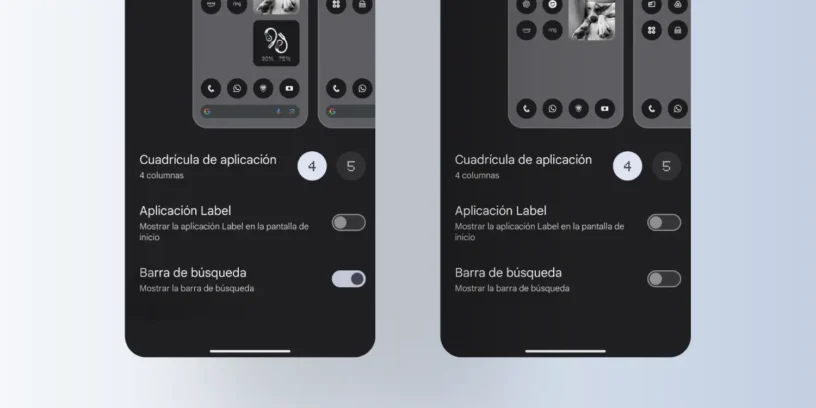



If you have a Nothing Phone (3a) o Nothing Phone (2), You've probably noticed that the Google search bar appears by default on your home screen. While this can be useful for some users, others prefer a cleaner, more customizable desktop. Luckily, Nothing OS It allows you to easily remove it without the need for third-party applications.
Next, we'll show you step by step. How to remove the Google search bar on your Nothing Phone.
Steps to remove the search bar in Nothing OS
To remove the search bar in Nothing OS, follow these simple steps:
- Press and hold an empty space on the home screen
- Select the option Personalization
- Enter the section Provision
- Deactivate the option Search bar
With these steps, the search bar will disappear from your home screen, allowing for a cleaner, more minimalist design.
Why remove the search bar?
Many users prefer to disable the search bar for various reasons:
- Aesthetics and minimalismBy removing it, the home screen becomes cleaner and more organized.
- More space for widgets or shortcuts.
- Avoid accidental touches by swiping on the home screen.
Can I reactivate it?
Yes, if at any point you want to recover it, simply follow the same steps and reactivate the option. Search bar in the configuration of Provision.

Nothing OS offers a flexible and customizable user experience, allowing for easy changes like this. If you're looking for a cleaner look for your home screen, Removing the search bar is an excellent option.



Leave a Reply