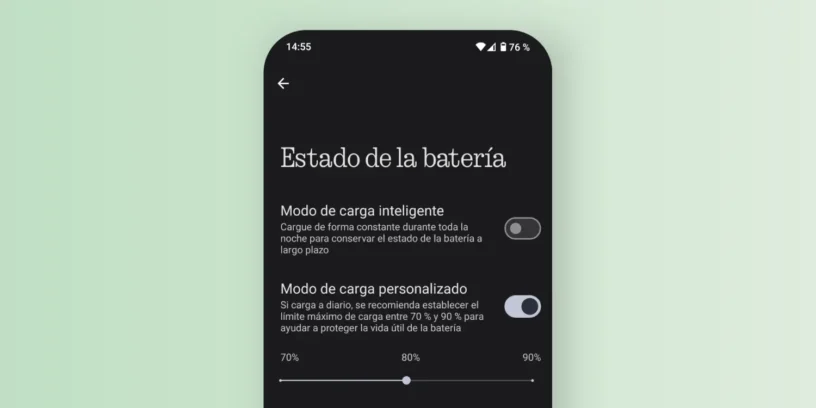



Nothing OS incorporates a very useful feature to extend battery life in the Nothing Phone: custom charging mode. This option allows you to limit the maximum load of the device to 70%, 80% or 90%, preventing the battery from being constantly charged at the 100%, which can affect its long-term durability.
How to activate custom charging on your Nothing Phone?
To configure this function on your phone, you can either Nothing or CMF by Nothing, Follow these steps:
- Go to Configuration.
- Enter the section of Battery.
- Click on Battery status.
- Select Custom charging mode.
- Choose your preferred load limit: 70%, 80% or 90%.
From that moment on, the phone will stop charging when it reaches the percentage you have selected, reducing unnecessary battery wear.
Why is it good to limit battery charging?
Lithium-ion batteries, like those in the Nothing Phone, degrade with each charge cycle. The longer they are left in the [unspecified location], the more they degrade. 100% load, The faster they wear out. Limit the load to 70% or 80% It helps minimize stress on the battery and can significantly extend its lifespan. Having the correct charger is also very important; see This article will help you find out which charger you should use. on your Nothing Phone.
Benefits of avoiding full loading
- Greater durabilityReducing the maximum load minimizes chemical aging of the battery.
- Less overheatingFull charges generate more heat, which can affect the health of the device.
- Better long-term performanceThe battery will maintain a better charging capacity after several months or years of use.

If you want to optimize your Nothing Phone's battery and extend its lifespan, Activating custom charging mode is one of the best decisions you can make.. Nothing OS continues to demonstrate its focus on user experience with useful and practical features like this one. For more tips like this, don't forget Follow me on Twitter!



Leave a Reply