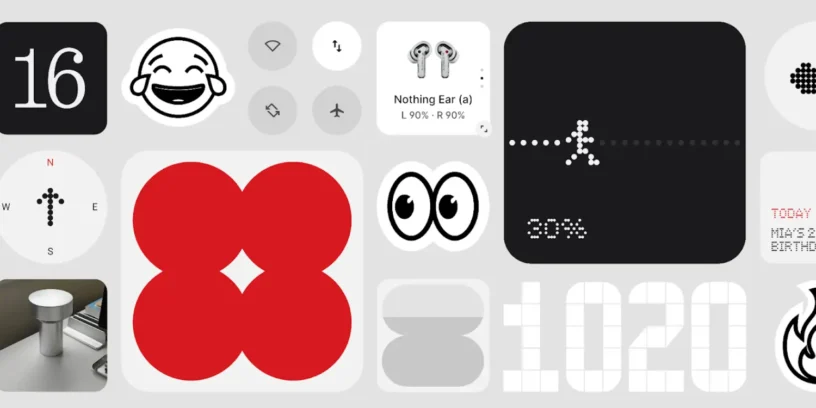
Nothing has officially launched Nothing OS 3.0, its new version of the operating system based on Android 15. This update It comes loaded with new features, design improvements, and performance optimizations, offering an even smoother and more personalized experience. Below, we'll tell you about all the most notable new features.
📲 Shared Widgets: Share more than ever
One of the most innovative features of Nothing OS 3.0 is the introduction of Shared Widgets, A completely new way to interact with friends and family. Now you can share widgets on your home screen and receive real-time reactions.
For now, this feature is only available between Nothing devices and only for the Photo Widgets (squares), However, the company is already working on expanding compatibility with other widgets. As it's still in beta, some bugs may be present, but improvements are expected with future updates.
🔒 More customizable lock screen
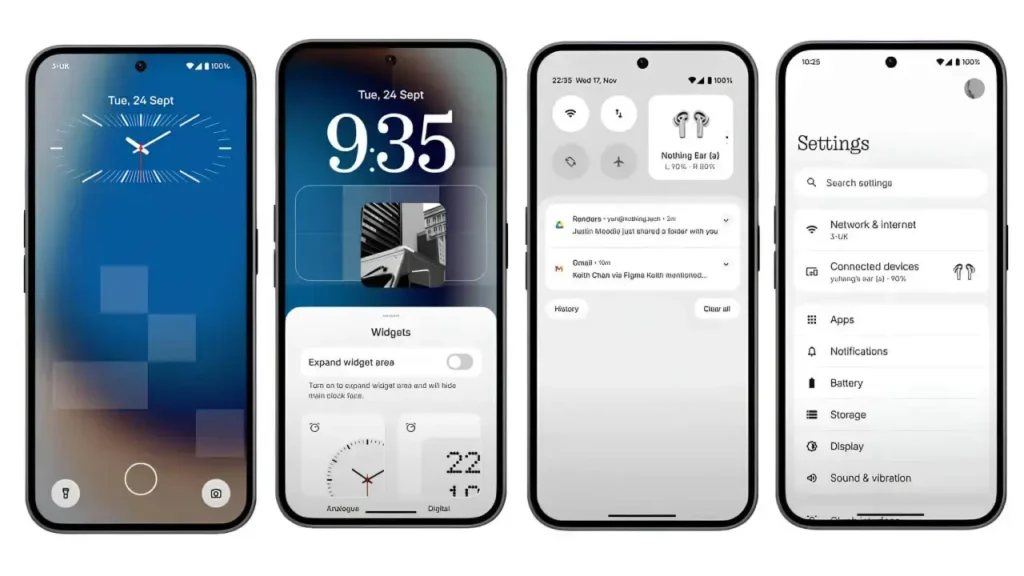
Nothing has redesigned the lock screen so you can customize it to your style:
- New lock screen customization page (accessible with a long press or from the customization settings).
- Greater variety of watch styles.
- Expanded space for widgets, allowing you to add more useful information without unlocking your device.
📌 New app drawer design
The app drawer organization has also evolved with a number of smart improvements:
- Smart Drawer with AI: Automatically categorize your apps into folders so you can find them faster.
- App pinning: Now you can pin your favorite apps to the top for easy access.
📱 Improved pop-up view
Multitasking in Nothing OS 3.0 has become more intuitive thanks to a more flexible pop-up view:
- You can drag the pop-up window to any part of the screen.
- Now it's possible resize it easily from the bottom corners.
- Option of fix the pop-up view to the edge of the screen for quick access.
- By swiping down on incoming notifications, you can open them directly in a pop-up view without leaving the app you are in (activated in Settings > Special features > Pop-up view).
🎨 Visual redesign and interface improvements
Nothing has refined the aesthetics of its system with several visual changes:
- Quick Settings redesigned, with a more intuitive editing experience.
- Updated widget library, with easier access to Nothing and third-party widgets.
- More visual adjustments, displaying the network and Bluetooth status more clearly.
- New Dot animation for fingerprint unlocking and device charging.

🚀 Other improvements and optimizations
- AI OptimizationLearn from your habits and prioritize the apps you use most often to keep them active for longer.
- Improved display of charging status on the lock screen.
- Auto-archiving function, which frees up space without deleting app data.
- New partial screen sharing option, ideal for recording only one window instead of the entire display.
- Setup wizard updated to version 3.0, improving the initial experience.
- Predictive animations when going backward, for smoother navigation.
- Security patch updated to December.
🎯 Nothing OS 3.0: A step forward in the Nothing experience
With Nothing OS 3.0, The brand continues to solidify its commitment to minimalist, fluid, and well-optimized software. The integration of AI, new customization options, and improvements in multitasking make this update one of the most significant to date.
If you have a Phone (1), Phone (2) or Phone (2a), Stay tuned for the update to enjoy all these new features. What do you think of Nothing OS 3.0? Leave us a comment! 😉

Leave a Reply