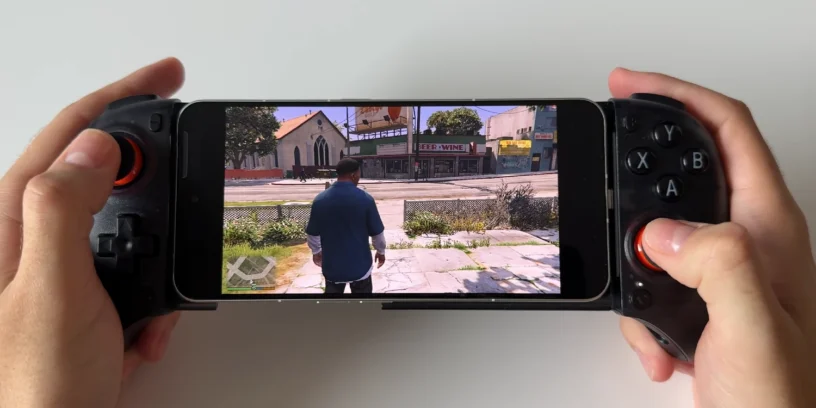


The idea of playing massive PC titles like GTA V on a mobile device is now a reality. The user Ben Geskin has shown that the Nothing Phone (3), Along with an emulation application, it is capable of delivering a complete and smooth PC gaming experience. This achievement represents a significant step for the gaming mobile, showcasing the potential of current devices.
What do you need to play?
To replicate this experience and enjoy GTA V, the setup is very simple. User Ben Geskin used a Nothing Phone (3), the application GameHub in its version 4.1.5 and a controller VITURE x 8BitDo. With this device, the performance was excellent, and it felt like playing on a PC, but with the convenience of a portable device.

Step-by-step guide: How to install and play GTA V
Playing GTA V on your mobile is easier than it seems. Follow these steps to do it:
- Download the app GameHub on your Android device. You can find it at: https://gamehub.xiaoji.com/
- Install the app on your Nothing Phone (3).
- Sign in with your email address or your Google or Apple account.
- Now, here comes the most important part: The Steam version of GTA V DOES NOT WORK. To play, you need a local, portable copy of the game on your hard drive.
- Connect your hard drive or SSD to your phone and transfer the entire GTA V game folder to your device's internal memory.
- Open the app GameHub and go to the "My" section at the top.
- Swipe right to find the option «"Import Games"».
- Select «"PC Game"» and your phone's files will open.
- Find and select the GTA V game folder.
- Choose the file GTAVLauncher.exe.
- GameHub will automatically download all necessary support files.
And that's it! You can now start GTA V and play directly on your Nothing Phone (3).
Performance and first impressions
Performance with this configuration is really good. The smoothness is remarkable, and the experience feels authentic. According to user Ben Geskin, the game is «"fully playable anytime, anywhere and, most surprisingly, without the need for an internet connection"». The ability to carry a 70GB game in your pocket and play it. offline It is a real step forward for the gaming mobile.



Kanishkroy5
kanishkroy5 hai na ji