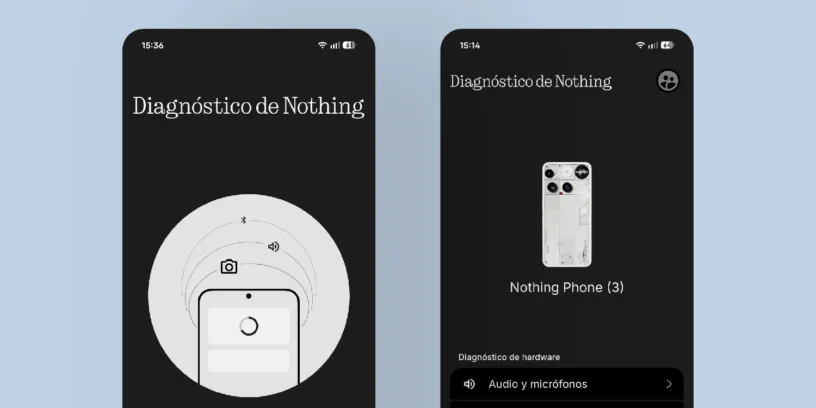



Nothing continues to refine its ecosystem with tools that reinforce its signature transparency. The brand recently updated its diagnostic center, an integrated utility that allows any user to check the health status of their hardware without relying on external technicians in the first instance.
To access this hidden menu, simply open the phone app and enter the code: *#*#9#*#*
ADVERTISING
A thorough inspection accessible to everyone
What stands out about this renovation is the minimalist interface, fully aligned with the aesthetic of Nothing OS. The main panel segments the tests into categories critical for daily use:
- Audio and microphones
- Cameras and images
- Connectivity and interfaces
- Display and screen
- Lighting and visual effects
- Energy and charging
- Sensors and detection
- Touch and input controls
Fast and visual diagnoses
The tool not only launches the tests, but also generates a recent diagnostic history. This is especially valuable if the device is experiencing intermittent failures; the software clearly indicates how many tests have passed and which have failed, making it easy to report to technical support if needed.
It's a smart move on Nothing's part. Giving the user the ability to "self-medicate" or at least understand what's wrong with their body. Nothing Phone.

Leave a Reply