

Nothing's gallery app is getting a major update, and this time we're not talking about a visual redesign. Nothing Gallery It adds a much-anticipated editing mode, a fundamental feature that eliminates the need for third-party apps for simple edits. Now you can not only view your photos, but also... edit them, improve them, and prepare them for sharing, without having to leave the application.
@nothingtec The Nothing Gallery app adds editing and enhancement options for photos! You can also trim and adjust the volume in videos 📲 #tip #nothingphone #nothingOS #nothingTec #nothingphone3 #nothing #app #nothingGallery ♬ cafe BGM 025 – Eigo Mattari
Integrated editing tools
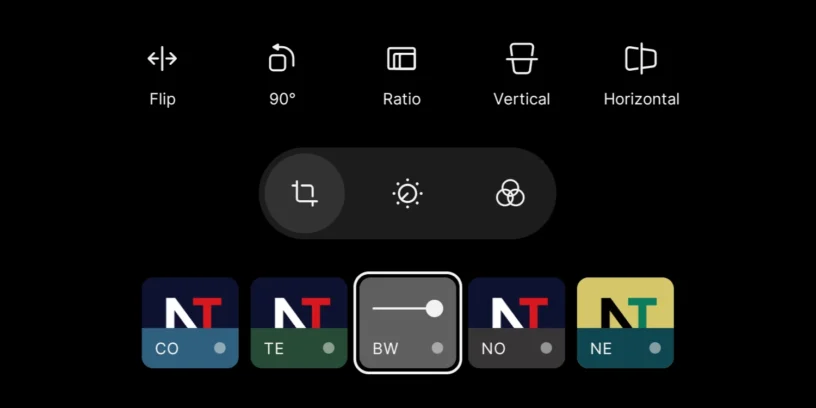
One of the biggest new features is the integration of a full editor within the gallery itself. No more switching between apps to make basic adjustments or edit photos: now everything is in one place.
Among the key features:
- Cut, rotate, flip, and stretch images with precision
- Adjust up to 12 different parameters, including exposure, contrast, saturation, brightness, warmth, shadows, highlights, and more
This makes Nothing Gallery a tool more professional, but without ceasing to be accessible.
Improved filter library
Nothing has added a collection of 10 new filters Inspired by the styles we already know from their camera app, these effects have a natural and elegant finish, designed for different styles:
- Everyone allows adjust the filter intensity to achieve the exact look you're looking for
- Cinematic, retro, or minimalist, For example
Integrated video editing
There are also new features for editing your videos. Now you can:
- Trim clips
- Adjust the audio volume
- Modify slow-motion sections in a video recorded in that way
Everything is done directly from the gallery, which is ideal if you frequently record videos and want to edit them quickly before sharing. It's not a professional editing app, but it's more than adequate for everyday use.
Improved editing experience
In addition to the new features, the app also improves the overall editing experience:
- You can see one Comparison between the original and edited images before saving
- And most importantly: The editing is non-destructive, so the original file is not lost

Advantages of Nothing as a native app
Nothing Gallery 2.0 isn't a generic app: it's specifically designed to integrate with Nothing's hardware and system. And it shows.
- Opening the gallery from the camera is now over 20.1% faster., and image processing is up to 25% faster than the %
- Third-party gallery apps are made for all types of mobile phones, but not optimized for any. They tend to be slower, more cluttered, and often include ads or features locked behind paid subscriptions.
None of that here. Everything just works.
Additionally, Nothing Gallery 2.0 Nothing preserves its distinctive visual style. From the typography and icons to the animations, everything maintains a consistent aesthetic. For example, the "smart cutout" feature (Image Cutout) is powered by the Dot Engine, which gives it a unique interaction when holding down a subject in a photo.
High-quality edition, with no losses or surprises
Another important point: the editing is done in full resolution, without aggressive compression or metadata loss. You can adjust aspects such as:
- Contrast
- White balance
- Tone curve
All processed locally on the device, without uploading anything to the cloud or altering the original data. It even maintains a light haptic vibration to make the edition more physical and satisfying.
And if you work with HDR images, it's compatible with Ultra XDR, This allows HDR data to be retained within the JPEG file itself using "gain maps". Most third-party apps compress this data; here it is preserved completely, exactly as you captured it.
Privacy by design
No mandatory accounts, no subscriptions, and no automatic cloud uploads. Everything stays on your mobile phone, Without unnecessary steps or extra risks. The editing remains high-quality, but with complete control over your files.
A great update, but I'm still waiting for other features.
This approach greatly improves the overall experience, but it's still missing some basic features. For example, you can't sort photos or albums by last modification or alphabetically. They're sorted by default by the number of photos saved, which is completely chaotic if you have dozens of albums. Similarly, when moving or copying a photo, you can get lost among the folders trying to find the one you want; you can't search within the copy or move section.
It's also a shame that the app can't delete part of a video and join the rest together. I hope the app continues to improve so substantially in the next update, just like they do with [other apps]. Nothing OS.


Leave a Reply