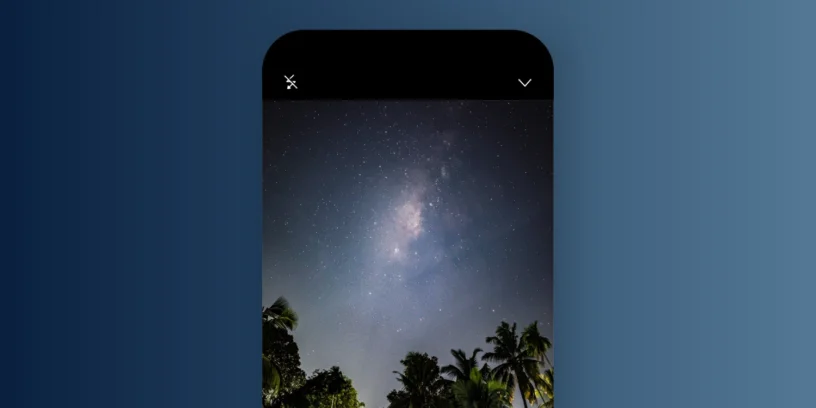


To do astrophotography You no longer need a super DSLR camera, a mobile phone is enough. It's true that the Nothing Phone (3) It doesn't have a specific mode for astrophotography, but thanks to the Expert Mode With the camera, it's possible to capture stars, constellations, and even the Milky Way. In this article, I'm going to tell you how to do it step by step., Thanks to the advice of Twitter user/X @Ajeesh021997, who has achieved spectacular results using this device.
Basic preparations before shooting
Before going into the camera settings, it is essential to consider some preliminary aspects that will make a difference:
- Find dark skiesIdeally, you should stay away from urban areas. You can use the web lightpollutionmap.info to locate places with low light pollution.
- Use a tripodIt is essential to avoid any vibration during the shot. Even the slightest movement can ruin the photo.
- Plan the shot with Stellarium: This free app It lets you see the real-time position of the Milky Way and other stars. That way you'll know exactly where to point your phone.
Recommended settings in expert mode
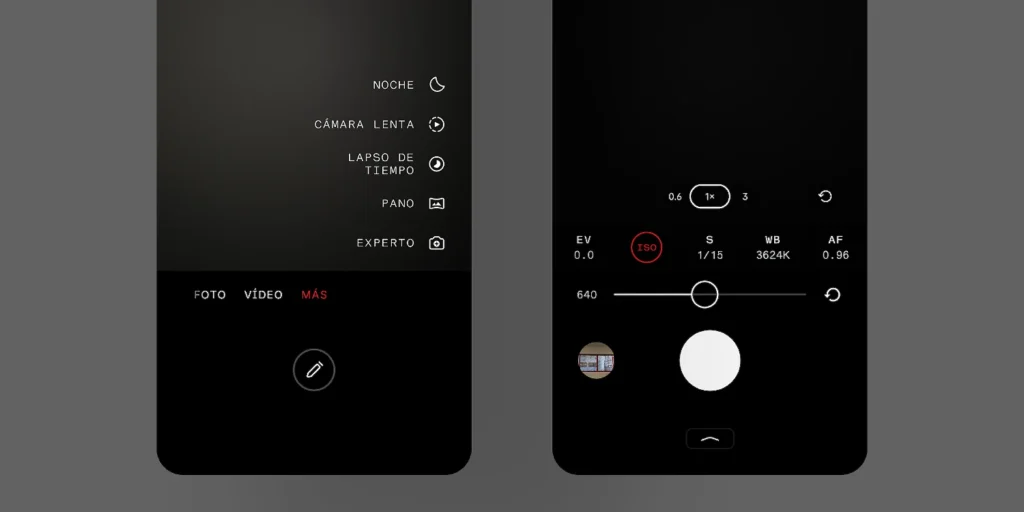
The Nothing Phone (3) includes a Expert mode which gives us total control over the camera. Here are the parameters suggested by @Ajeesh021997:
- ISO: Between 600 and 1200, Depending on how much light pollution there is in your area. The higher the ISO, the greater the sensitivity, but also the more noise.
- Shutter speed: Of 13 to 30 seconds, Adjusting it according to the ISO. If you're using a high ISO (e.g., 1200), try 13 seconds. If the ISO is low (e.g., 600), go for 25-30 seconds.
- ApproachPut it in infinite manually to avoid blurring the stars.
- White balance: It's up to you. You can choose a cooler tone for a blue sky or a warmer one if you prefer an orange aesthetic.

Extra tips to improve your captures
- Activate the timer so that the photo is taken 3 or 10 seconds after pressing the button. This prevents vibrations.
- Do not use HDR or filters While you're taking the photo. Everything should be raw to avoid unnecessary processing.
- Check the image after each shot, and adjust the settings if you see that it is overexposed or too dark.
Capturing the starry sky with a Nothing Phone is more than possible if you have patience and follow these steps. Special thanks to @Ajeesh021997 by sharing their experience and setup, demonstrating that you don't need a professional camera to enjoy astrophotography.




Leave a Reply