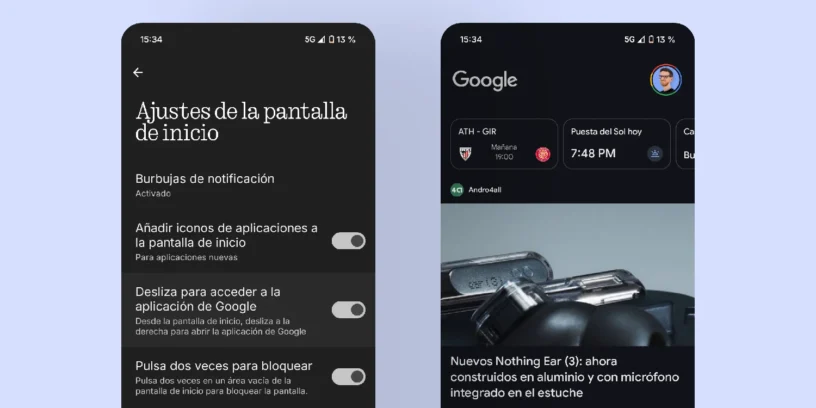

If you've chosen a Nothing Phone, you probably appreciate its aesthetics and the clean user experience it offers. However, some default elements, like accessing the Google app by swiping right, slightly break with that philosophy. Personally, I'm one of those who prefers to have a home screen completely free of pre-installed items, And luckily, Nothing OS It allows you to get rid of this very easily.
It's a quick process that will help you achieve an even more minimalist interface and, best of all, it works the same on any model of the brand.

Deactivate the Google dashboard and take control
Nothing OS's design makes these kinds of adjustments straightforward. You won't need to download anything extra or search through hidden menus; everything is done directly from the home screen settings.
Here are the steps:
- Press and hold an empty space on your home screen until the menu appears.
- Select «"Home screen settings"» at the bottom.
- Once inside, look for the option that says «"Swipe to access the Google app"».
- Finally, simply turn off the switch.
When you return to the home screen, you'll notice that the gesture no longer takes you to the Google app, leaving a cleaner space. It's a small change, but it makes a big difference in your daily life, and you can still access that space by opening the "Google" app in your app drawer. Furthermore Does the Google search bar bother you?, You'll be happy to know that you can also remove it.




Jose Manuel
I love your website, but… In this article you say: «When you return to the home screen, you’ll notice that the gesture no longer takes you to the Google app, leaving a cleaner space ready for you to use as you prefer.».
You can't use it however you like; in fact, you just remove it and that's it. If I'm wrong, I'd love for you to tell me how I can use it outside of the Google app.
Still! Great job!
ruudhesp
Hello Jose Manuel!
Thanks for your comment. If you remove it from the home screen, you can access that same "space" in the "Google" app, which you'll find in your app drawer. That's what I meant in the article; perhaps it wasn't entirely clear, sorry. I just edited it to make it less confusing.
Thanks for your comment! If that wasn't what you meant in your comment, let me know!
Greetings