

Experiencing a problem with your phone for weeks without being able to find the cause is one of the most frustrating experiences there is.This is exactly what's been happening to me lately with my Nothing Phone.Overnight, the system decided to automatically log me out of my Nothing account.Sometimes it happened within a few hours of starting the app, other times it took a day, and there are users who experience it every time they open an application within the ecosystem.
This problem isn't just a nuisance because you have to constantly re-enter your information; it directly impacts the user experience of the device. When you log out, functions like Essential Space They stop responding when you try to save a memory. It also directly affects custom widgets. Nothing Playground, which become completely inactive when the link to your account is lost. To make matters worse, the application Nothing X This shutdown also affects you, which means temporarily losing your custom headphone or watch settings until you log back in.
ADVERTISING
Fortunately, after thoroughly investigating in the Nothing community forums, I've found the solution. It's been recommended for quite some time, and although it might seem like a joke or a rather outlandish solution, it works perfectly. The problem seems to be related to a synchronization issue with the server, and the way to fix it is to force a refresh of your data.
Steps to fix Nothing account login
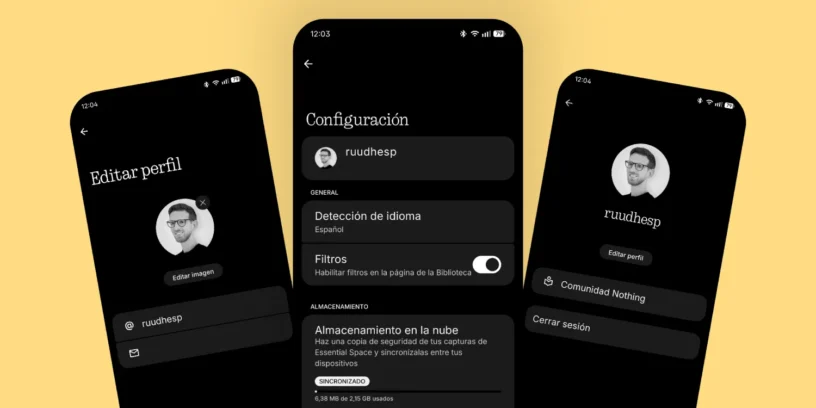
The solution is to change your profile picture and username on your Nothing account while logged in.. To do this, simply follow these easy steps:
- Make sure login once again in order to make the changes
- Enter the Settings from your Nothing Phone
- In the upper right corner you will see your profile picture (or a gray circle if you don't have one) and tap on it
- Enter the option of Edit profile
- Select Edit image And change your profile picture. You can upload a new one or re-upload the same one later.
- Also take the opportunity to slightly modify your alias or username
The key to this trick is to "refresh" your account information. By modifying these fields, you force the system to send a new, clean sync request to Nothing's servers, eliminating the loop that was causing the constant logouts.
ADVERTISING
Once you've made this change in your phone's settings, the rest of the apps like Nothing X or Essential Space will activate automatically, or you'll just need to log in to them one last time.. After this, the problem will disappear completely and your session will no longer close unexpectedly.. It's a curious solution, but completely effective in restoring stability to our ecosystem.


Leave a Reply