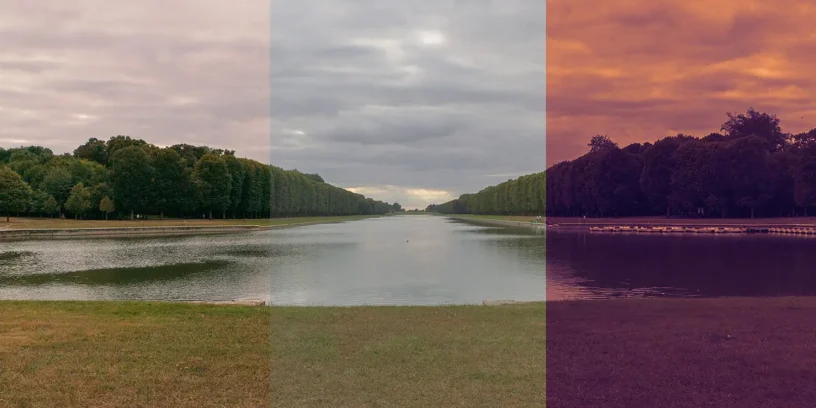



With the introduction of camera presets in the Nothing Phone series (3a), Nothing has taken a major step forward in improving mobile photography. One of the most notable features is the ability to apply LUTs (Look-Up Tables) directly in the camera app. This allows users to apply professional live color gradations in the viewfinder, eliminating the need for post-processing. In this tutorial, you will learn how to create your Nothing Camera LUTs using LA Chat GPT.
This functionality has been explored in detail by @kustom_tf, who He shared a tutorial on the Nothing Community forum with valuable information on how to get the most out of Camera Presets. You can check out his original post here: Nothing Community.
What are LUTs and why should you use them?
LUTs are pre-configured color grading files used in the film and photography industry to achieve specific visual styles. They transform the colors of an image to match a desired aesthetic, similar to filters but with greater precision and control. By importing a .cube file into the Nothing camera app, you can instantly achieve cinematic or custom looks without needing external software.
How to import LUTs into the Nothing camera app
Using LUTs in the Nothing camera app is very simple:
- Get a file
.cube(more information below). - Open the Nothing camera app.
- Go to the submenu Filter.
- Select Import LUT and choose your file
.cube. - Once imported, the LUT will be available as a filter for live preview and immediate use.
How to create or obtain files .cube
There are several ways to obtain files .cube to use them in the Nothing camera app:
- Download existing LUTs: many websites offer free or paid LUTs based on specific movies, series, or color styles.
- Create your own LUTs: with programs like DaVinci Resolve or Adobe Photoshop, you can design custom LUTs that suit your creative vision.
- Generate LUTs with ChatGPT: an innovative technique shared by the community involves using ChatGPT to create
.cubefiles. This method is free and accessible, although it may require a ChatGPT account.
Examples of AI-generated LUTs
Some users have managed to create LUTs inspired by popular movies and TV series using AI-generated prompts. Here are two examples:
Create a LUT based on the Severance TV series color palette and generate a .cube file


Result: a cold, desaturated tone that mimics the unsettling atmosphere of the series.
Create a LUT based on the Mad Max movie color palette and generate a .cube file


Result: A high-contrast, warm-toned preset that enhances desert landscapes and dramatic lighting.
Why is this function important?
The ability to apply LUTs directly in Nothing's camera app is a major advancement for mobile photographers and videographers. It not only streamlines workflow but also opens the door to creative experimentation. Whether you want to replicate the cinematic look of a favorite film or create a unique style, LUTs provide an easy and powerful solution.


Try it yourself!
If you have a Nothing Phone (3a) series device, try out the LUTs and experiment with different styles. Share your creations with the Spanish community of Nothing. this is only the beginning of what's possible with Nothing's camera .



Leave a Reply