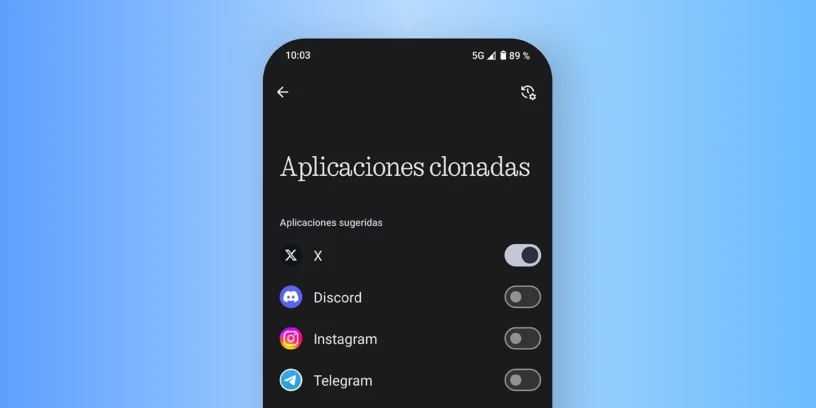

Want to have two WhatsApp, Instagram, or other app accounts on your Nothing Phone? With Nothing OS It's very easy thanks to the function of Cloned Applications, This feature allows you to duplicate some compatible apps for independent use. This is especially useful if you have a personal account and a work account, or if you share your phone with someone else and want to maintain separate sessions.
Steps to clone an application in Nothing OS
To duplicate an app on your Nothing Phone, just follow these steps:
- Go to Settings > Apps > Cloned apps.
- On that screen you will see a list of compatible apps.
- Select the app you want to clone.
If you don't see the app you want to duplicate, tap on “View other apps” To access more options. Once activated, you'll have a second version of the app installed, with its own icon, settings, and separate data. This means you can log in with a different account without affecting the original app.
It's worth noting that not all apps allow duplication, as it depends on the support each app offers. Common apps like WhatsApp, Messenger, Facebook, and Telegram are usually available for cloning without issue.
How to delete a cloned app
If at any point you no longer need the duplicated app, you can delete it in two ways:
- From the cloned app icon: Press and hold your finger on it, go to “App info” and select “Uninstall”.
- From Settings: Return to the section of cloned applications and deactivate the one you no longer want to use.
In In neither case will you lose the original app, Just the cloned one. It's a simple and secure way to manage multiple accounts from the same phone. Plus, you can clone the app again at any time if needed.
Did this trick work for you?
Do you want to hide this second duplicate app? Click here to learn how to do it. If you liked this tutorial and want more tips or guides about NothingOS, you can follow me on my social media:
See you around with more useful content about Nothing!



Leave a Reply