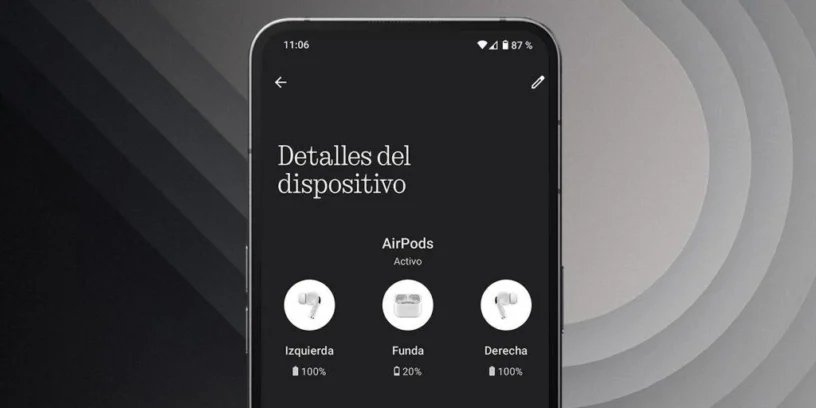

AirPods support is an experimental feature added by Nothing that allows Improve compatibility between Apple AirPods and Nothing Phone. Although these headphones work with any Bluetooth device, Apple optimizes them for its ecosystem, leaving out some options when connecting to Android phones.
With this function enabled, the Nothing Phone can show the battery level of the AirPods and the charging case directly on the phone's interface, similar to how it works on iOS. This makes it easy to monitor battery status without needing third-party apps.
If you're hesitating between the AirPods Pro 2 and the Nothing Ear, in [our comparative article] We thoroughly analyzed both models to help you choose which one is best for your needs.
Why is there no support for AirPods in experimental features?
The reason this feature doesn't appear on some Nothing Phones is simple: It is not integrated into the system by default., but rather depends on a specific application to be enabled.
This means that if you don't have the correct app installed, the option won't appear in the menu. «"Experimental functions"» within the settings of Nothing OS.
How to make AirPods support appear on your Nothing Phone
If the option to activate AirPods support does not appear on your Nothing Phone, follow these steps:
- Download the app Nothing X from the Google Play Store.
- Install and open the application on your Nothing Phone.
- Go to Settings and enters the section of «"Special functions / Experimental functions"».
- Now you should see the option «"AirPod Holder"» Available. Activate it and Enjoy better integration with your Apple headphones.
If you have any questions or need more help with your Nothing Phone, leave them in the comments. I hope this guide has been helpful!



Leave a Reply