
Android 15 brings several interesting improvements, and one of the most useful—though somewhat quiet—is the option to archive applications. If you have a Nothing Phone Compatible, this feature can help you free up space without complications and without having to get rid of your favorite apps.
What does it mean to archive an app?
Basically, Android deletes the largest part, the installation file (APK), but It saves all your data and settings.. Even the app icon still appears in your app drawer or on your home screen as if nothing happened. When you want to use it again, your Nothing Phone automatically downloads it from Google Play and restores it to its previous state. No hassle, no need to configure it from scratch.
Perfect for apps you rarely use.
This is great for those apps you only open occasionally. For example, that video editor you use for occasional projects, or a travel app you only need once a year. Instead of taking up space all the time, You can archive them without losing anything..
Practical example: how you can use it
Imagine you have a video editing app installed that's almost 2 GB. You don't use it every day, but you don't want to delete it because you've already saved your settings and started some projects. Instead of uninstalling it, you simply archive it. Your Nothing Phone frees up that space, but when you decide to open it again, it will automatically download and everything will be exactly as you left it. Quick, easy, and without losing anything.
How do I archive an app?
It's very easy to do. You just have to:
- Press and hold the app icon that you want to archive.
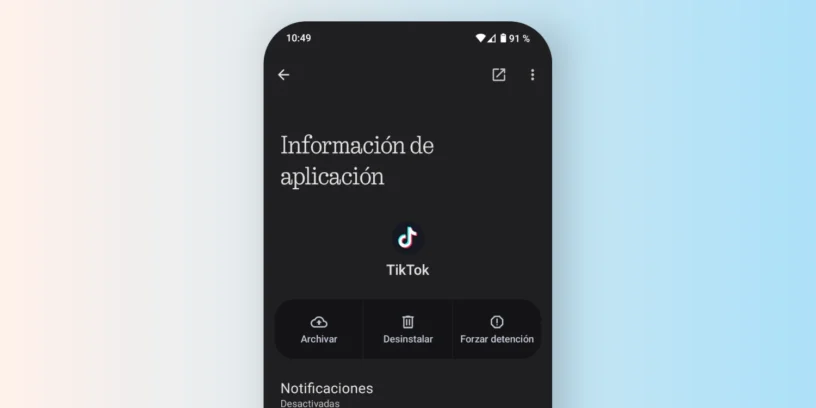
- Play on «"Application Information"».
- And within the menu, select the option «"File"» (if available).
With these steps, you'll free up space in seconds without losing anything. And if you need it again later, just repeat the same process and click "Restore.".

Are there any limitations?
Yes, not all apps are compatible. Developers need to enable this feature. so the system can archive them. But more and more apps are doing it, and Google is pushing to make it commonplace.
Although archiving is something that can be used on any mobile phone with Android 15, Nothing OS It integrates it in a way that visually fits with the brand's clean and minimalist design.. Everything feels natural, without patches or hidden functions.
A simple way to free up space
In short: if you notice you're running out of space, there's no need to delete anything willy-nilly. With Android 15 and your Nothing Phone, you can archive what you don't use and retrieve it whenever you want. It's that simple, and without wasting time or making adjustments.




Leave a Reply