
In everyday life, the security of our mobile It's a priority. We tend to focus on strong passwords, fingerprints, or facial recognition, but we often overlook a crucial detail: access to quick settings.
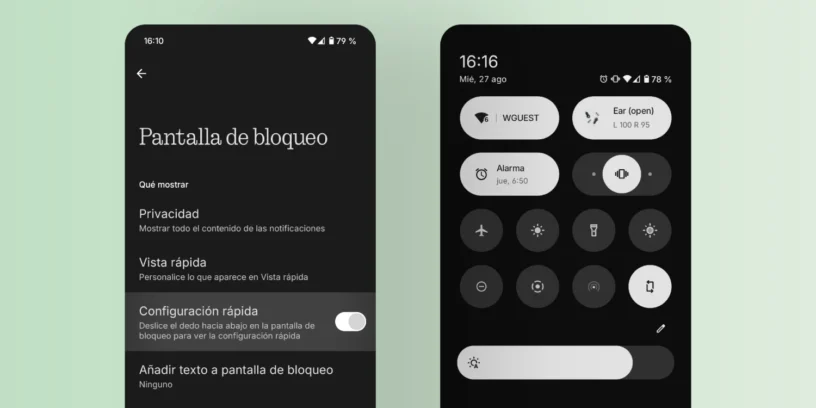
From the notification bar, we can turn Wi-Fi, mobile data, or airplane mode on or off, even with the screen locked. This feature, which can be very convenient, also becomes a vulnerability in case of theft. If someone picks up your phone, they can put it in airplane mode in seconds, preventing you from tracking or locating them.
If you're worried about the security of your Nothing Phone, Today I bring you a simple but very effective trick to protect your device from prying eyes and hands.
The solution: disable quick access from the lock screen
Luckily, Nothing OS It gives us a very simple option to solve this problem. You don't have to install third-party applications or do anything complicated. The trick lies in a native system setting.
Here I explain, step by step, how to do it:
- Go to Settings on your Nothing Phone.
- Look for the option Lock screen.
- Within that menu, you'll see an option called Quick Setup.
- By default, this option will be enabled. Deactivate it.
And that's it! From now on, to access quick settings, you'll first have to unlock your phone. Simple, right? With this small change, No one will be able to put your phone in airplane mode, disable GPS or Wi-Fi. without knowing your password or having access to your fingerprint.

Reinforce security to the maximum.
This trick is a great first step, but if you take security seriously, there's more you can do. I recommend checking out the lock screen widgets. Some of them could grant access to sensitive functions or provide information you don't want others to see. Remove any widgets that could pose a risk if your phone is lost or stolen.
Furthermore, if you want to go a step further, I suggest that Configure your mobile phone so that the thief cannot turn it off either. without unlocking it. This way, the device will remain powered on and connected, giving you more time to track it.
Security doesn't have to be complicated. Sometimes, the simplest tricks are the most effective. With this adjustment to your Nothing Phone, You can rest easier knowing that your information and your device are better protected.




Leave a Reply