The Nothing ecosystem continues to refine details to make the software more practical and less intrusive in daily use. The latest Essential Voice update goes straight to solving two of the most frustrating things: waiting times and the lack of options to customize the buttons to our liking.
What's New in Essential Voice
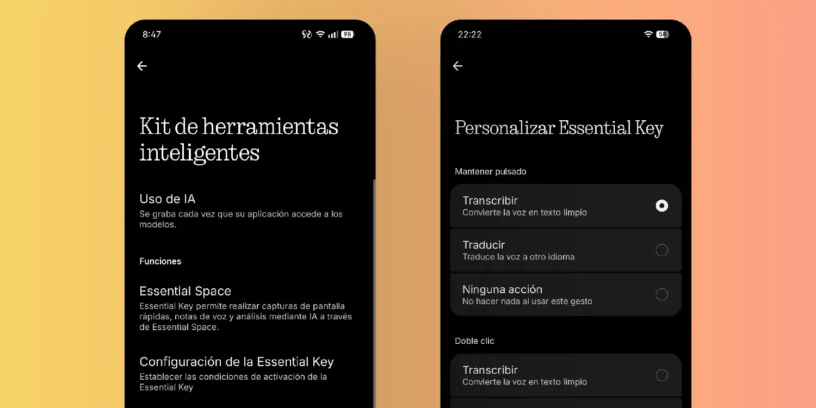
The first thing you'll notice is that it's faster. Speed and accuracy in voice processing have been improved. But the biggest innovation in this update is how it integrates with the Essential Key while using the keyboard. Now we can choose what the button does depending on how it's pressed:
- Long press or double click: Different actions can be assigned to each of these two gestures so as not to depend on a single function.
- Transcribe or translate instantly: It allows you to choose whether you want the button to convert speech to plain text (in more than 100 languages) or whether you prefer it to directly translate what you say (in more than 70 languages)
ADVERTISING
On the other hand, this update removes a similar feature that was quite good and very convenient. Previously, you could record audio in one take and, right at the end, ask it to translate into a specific language, like "translate it into [language]," and the AI would do it without hesitation. Now, with the behavior predefined by the buttons, you're forced to use only one language, and you can no longer request these changes on the fly with voice commands. The tap-based system is great, but they could have allowed both options to coexist; that would have been ideal. Pauwma describes it very well in his publication.
How to configure the new gestures
To test it and configure the button to your liking, the process is quite simple. From there, you can configure both types of presses in just a couple of clicks:
Settings > Smart Toolkit > Essential Voice > Customize Essential Key
Available starting today on the Phone (4a). Available out of the box on the Phone (4b). Coming to the Phone (4a) Pro later this month and the Phone (3) in August.



Leave a Reply