


Nothing has launched a New update for Nothing OS 3.1 for phones Phone (3a) and Phone (3a) Pro. This update brings a number of significant improvements to the operating system, offering a smoother and more optimized experience for users of both models. Be sure to update your device to enjoy all the new features!
What's new in Nothing OS 3.1?
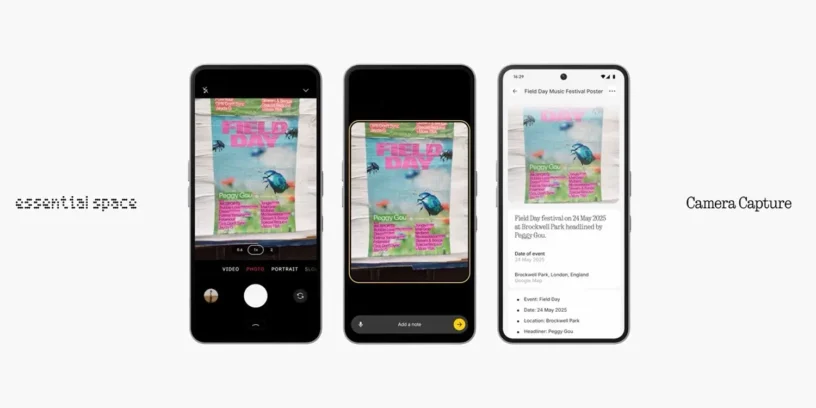
The main new feature of this update is the integration of the Essential Key in the camera app. Now, with a simple tap, you can capture real-world content and add notes, or, if you press and hold, record a voice input. This makes it easier to separate your photos in the camera app from Essential Space, improving your experience when organizing memories.
In addition to this feature, Nothing OS 3.1 improves several aspects of the camera and Always-On Display (AOD), along with other optimizations for smoother performance.
Improvements to the cameras of Phone (3a) and Phone (3a) Pro
- 🔍 More intuitive zoom interactionNow you can zoom in more easily and precisely.
- 🤳 Correction of reddish skin toneThe problem with selfies on the front camera has been fixed.
- 🌟 Improved white balance: Colors now look more natural in indoor scenes with the rear camera.
- 👤 Improved clarity and tone in portraitsCapture portraits with better exposure and detail, even in backlit conditions.
- ⚡ Faster performance: The overall camera speed has been optimized for a more agile experience.
Other important improvements
- 🖼️ Improvements to Essential SpaceNow the Essential Space experience is smoother, optimizing its performance.
- ⚡ Improved AOD transition animationsThe Always-On display animations are now smoother and more natural.
- 🐞 TroubleshootingSeveral errors have been corrected and the overall stability of the system has been improved.
How to upgrade to Nothing OS 3.1
If you just bought your Phone (3a) o Phone (3a) Pro, We recommend that you connect to the internet immediately and perform the OTA update to the latest version of the operating system. This will ensure that you can enjoy all the improvements and new features from the start.
To update, just go to Settings > System > System updates and check if it's already available for your device.
Warning: During the update, the system will perform background optimization, which may cause a temporary increase in device temperature and higher battery consumption. However, these effects will disappear once the update is complete.



Leave a Reply