
Do you have a website you visit every day? One you love, that you read with your coffee, on the train, or while pretending to be busy at work? Well, there's a way very simple to make it even more accessible: add it as a app on your home screen. And yes, we're talking about you putting This website, NothingTec, just like any other app on your phone.
How to do it step by step
The process is quick and you don't need to install anything. Just follow these steps:
- Open your preferred browser (I'll tell you which one is the best below).
- Go to the website you want to add
- Tap the three dots (⋮) in the upper right.
- Click on «"Add to home screen"».
- Give it a name (or leave the default one).
- Accept, and that's it: you'll have a shortcut with custom icon on your screen.
However, not all browsers do it equally well…
Google Chrome: the best experience
After testing it on several browsers, Chrome is the most polished If you want the shortcut to look like a real app:
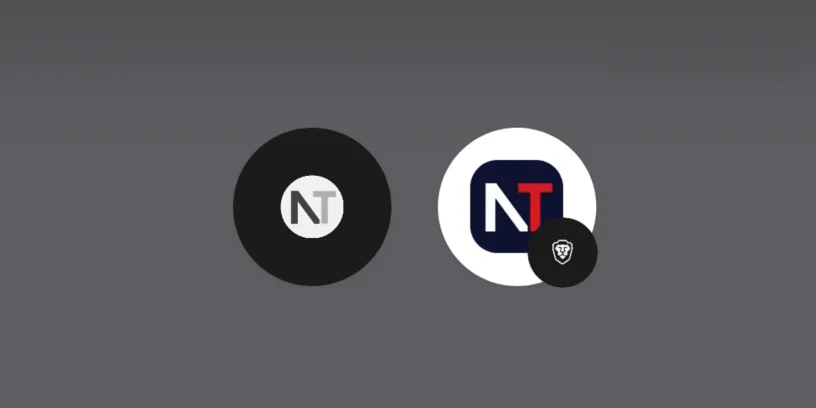
- Respect the monochromatic aesthetic of the icon if you use that style.
- Add the icon to application drawer, not just to the home screen.
- When you open it, it feels like an app: no navigation bar, clean and fast loading.
Ideal if you have an icon design intended to match the Nothing look.

Brave: useful but with limitations
With Brave you can also add your website, but it has several drawbacks:
- It does not respect the monochromatic design, even if you have it configured that way.
- It is not added to the app drawer, only as a shortcut.
- Furthermore, he adds a small subicon of Brave, making it clear that it is a simple web access.
Come on, It works, But if you're looking for a more integrated experience, Chrome is clearly superior.

Adding your favorite website (wink wink) as an app on your Nothing Phone is a great way to always have it at hand., as if it were just another native app. You just need to use Chrome and you'll get a perfect result. If you haven't tried it yet, give it a chance... and start by adding NothingTec 😉



Leave a Reply