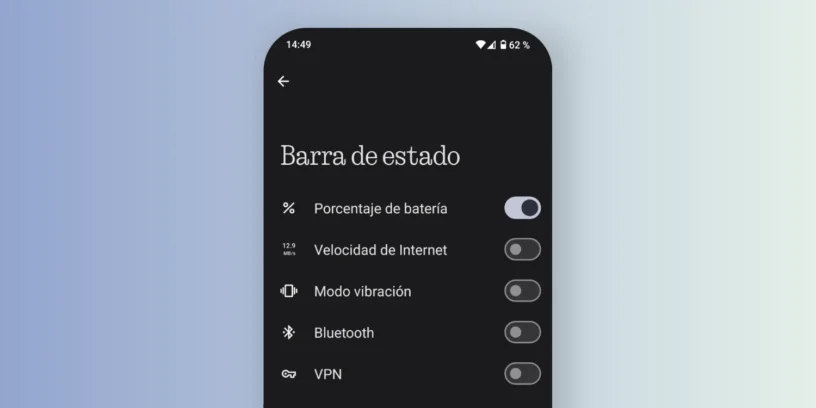

The status bar, located at the top of the screen, displays icons such as Wi-Fi, battery, NFC, and Bluetooth. While these can be useful, they sometimes take up visual space that we'd prefer to keep clean. Fortunately, Nothing Phone devices allow you to hide or remove icons from the status bar.
Steps to hide status bar icons
To remove specific icons from the status bar on your Nothing Phone, follow this path within the system:
- Access Configuration.
- Enter Display.
- Click on Status bar.
Once inside, you'll see a list of various icons that you can activate or deactivate according to your preferences. Among them is the icon for vibration mode, Bluetooth, Wi-Fi, NFC, airplane mode, the battery , or mobile network. This feature is ideal if you want a cleaner look focused on the essentials.
Other ways to personalize your Nothing Phone
In addition to this option, you'll find more tips on the blog to personalize your Nothing OS experience:
- Hide apps from the app drawer
- Add stickers without background to your home screen
- Remove the Google search bar from the home screen
These options let you customize your phone to your style, removing elements you don't need or simply prefer not to see. Nothing OS offers a highly customizable experience, and understanding these settings will help you get the most out of it.




Leave a Reply